React Performance Optimization Techniques That Actually Matter
Performance problems in React rarely come from React itself — they come from components re-rendering more than they need to, bundles that ship more code than the user will ever touch, and lists rendering thousands of DOM nodes at once. The good news is that React gives you enough tools to fix all three, as long as you know when each one actually applies.
This article walks through the techniques that make a real difference in production apps: memoization, code splitting, virtualization, and how to actually measure whether any of it helped.
Why "just optimize everything" doesn't work
It's tempting to wrap every component in React.memo and every function in useCallback the moment you hear "performance." In practice, this often makes things worse: memoization itself has a cost (comparing props on every render), and sprinkling it everywhere adds complexity without a measurable benefit.
The right order is:
- Measure first — find out where time is actually being spent.
- Identify the bottleneck — is it re-renders, a large bundle, or a huge list?
- Apply the targeted fix — not a blanket one.
Keep that order in mind as you go through the rest of this guide.
Memoization: stopping unnecessary re-renders
By default, a React component re-renders whenever its parent re-renders, even if its own props haven't changed. React.memo wraps a component so it only re-renders when its props actually change:
const MyComponent = React.memo(({ data }) => {
  return <div>{data.name}</div>;
});
This only helps if data is referentially stable — if the parent creates a new object on every render ({ name: 'foo' } inline, for example), React.memo won't help at all, since the reference changes every time even though the content looks the same.
That's where useMemo and useCallback come in — not as general-purpose performance tools, but specifically to keep references stable so memoized children can actually skip re-rendering:
const user = useMemo(() => ({ name: firstName, age }), [firstName, age]);

const handleClick = useCallback(() => {
  doSomething(id);
}, [id]);
A common mistake is using useMemo/useCallback on values that are cheap to recompute and never passed to a memoized child — in that case, the memoization overhead can outweigh the benefit. Reach for them when:
- The value is expensive to compute (a heavy calculation, a large derived array)
- The value or function is passed down to a component wrapped in
React.memo - The value is a dependency of another hook (
useEffect,useMemo) where an unstable reference would cause it to re-run constantly
Code splitting: shipping less upfront
Every component your bundler includes ships to the user on first load, whether they need it immediately or not. Code splitting defers loading a component until it's actually needed:
const HeavyComponent = lazy(() => import('./HeavyComponent'));

function App() {
  return (
    <Suspense fallback={<div>Loading...</div>}>
      <HeavyComponent />
    </Suspense>
  );
}
Good candidates for code splitting:
- Routes the user hasn't navigated to yet
- Modals, dialogs, or panels that only render after an interaction
- Heavy third-party libraries (rich text editors, charting libraries, PDF viewers) used on a single page
A quick way to see if it's worth doing: run a bundle analyzer (source-map-explorer or webpack-bundle-analyzer) and look for large dependencies that only serve one route or one rarely-used feature.
Virtualization: rendering only what's visible
Rendering a list of 5,000 items means creating 5,000 DOM nodes, even if only 10 are visible on screen at a time. Virtualization renders only the items currently in (or near) the viewport, swapping content in and out as the user scrolls:
import { FixedSizeList } from 'react-window';

function Row({ index, style }) {
  return <div style={style}>Row {index}</div>;
}

function VirtualizedList({ items }) {
  return (
    <FixedSizeList
      height={400}
      width={300}
      itemCount={items.length}
      itemSize={35}
    >
      {Row}
    </FixedSizeList>
  );
}
Libraries like react-window or react-virtualized handle the scroll math for you. As a rule of thumb, virtualization is worth reaching for once a list regularly renders more than a few hundred items — below that, the DOM cost is usually small enough that it's not the bottleneck.
Measuring performance before and after
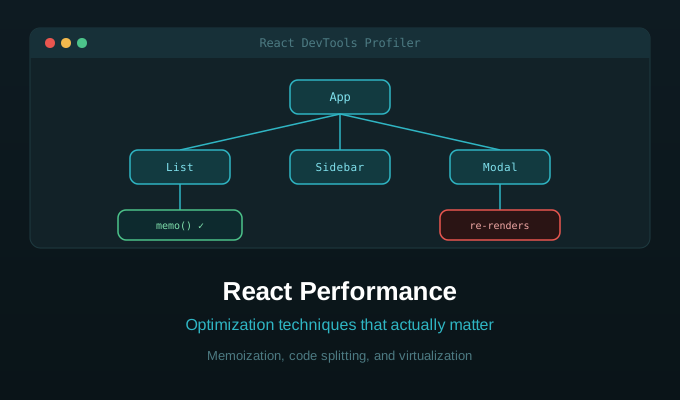
None of the techniques above matter if you can't confirm they actually helped. React DevTools' Profiler tab records a session and shows exactly which components rendered, how long each render took, and why the render happened (props changed, state changed, or a parent re-rendered).
A simple workflow:
- Open the Profiler tab and start recording.
- Perform the interaction that feels slow (typing, scrolling, opening a modal).
- Stop recording and look at the flame graph — wide bars are components taking longer to render; a component lighting up repeatedly without prop changes is a strong candidate for
React.memo.
For broader page-load metrics — first contentful paint, largest contentful paint, total blocking time — Chrome DevTools' Performance tab and Lighthouse give a fuller picture than the React Profiler alone, since they cover work happening outside of React (network requests, parsing, layout).
Best practices checklist
- Profile before optimizing — don't guess where the bottleneck is.
- Avoid inline objects and functions in render when they're passed to memoized children — a new object literal on every render defeats
React.memo. - Use
useMemoanduseCallbackdeliberately, not by default on every value and function. - Minimize bundle size by code-splitting routes and heavy, rarely-used dependencies.
- Virtualize large lists, not small ones — the added complexity isn't worth it for a 20-item list.
- Re-measure after each change — a fix that isn't validated is just a guess that happened to feel right.
Conclusion
React performance optimization isn't about applying every technique at once — it's about measuring first, finding the actual bottleneck, and applying the fix that matches it. Memoization solves unnecessary re-renders, code splitting solves oversized bundles, and virtualization solves long lists. Used in the wrong place, each of these adds complexity without a real benefit; used where they fit, they can turn a sluggish interface into one that feels instant.
What's the performance issue you've run into most often in React — re-renders, bundle size, or something else? Let me know in the comments.